In the world of freelancing, specifically in DevOps and System Administration, trust is the hardest currency to earn. When a client posts a job about a “broken server” or “CORS connectivity issues,” hundreds of freelancers apply with generic promises like “I can fix it” or “Trust me, I’m an expert.”
I prefer a different approach: Don’t just promise to fix it. Simulate it, break it, fix it, and then apply.
Recently, I encountered a project involving a broken Staging environment on Hetzner running Ubuntu 24.04. Here is the story of how I spent two hours simulating the entire stack inside Google Colab to solve a complex Typesense & Nginx connectivity issue before even sending my proposal.
The Challenge
The client had a specific infrastructure problem:
- Infrastructure: Hetzner Cloud (Ubuntu 24.04).
- Tech Stack: Nginx (Reverse Proxy), PM2, Typesense (Search Engine).
- The Issue: Their staging frontend could not connect to Typesense due to CORS (Cross-Origin Resource Sharing) errors.
- The Goal: Fix connectivity and export the current Data Schema for the development team.
The Strategy: Google Colab as a DevOps Sandbox
I didn’t want to spin up a paid VPS just to test a theory, and I certainly didn’t want to experiment on the client’s live server. I realized that Google Colab is essentially a free, powerful Ubuntu VM that I could use as a sandbox.
I wrote a Python script to replicate the client’s environment entirely within a browser tab:
- Environment Setup: Installed Nginx, Node.js (for PM2), and downloaded the specific Typesense binary.
- Process Management: Configured PM2 to manage the Typesense process, mimicking the client’s setup exactly.
- Tunneling: Used Ngrok to expose the local Nginx server to the public internet, simulating a real Staging URL to test external access.
The Fix: Taming the CORS Beast
The issue wasn’t just in Typesense configuration; it was how Nginx handled the OPTIONS preflight requests. The frontend was sending a preflight check, and Nginx was blocking it before it could reach the search engine.
I crafted a custom Nginx configuration block to explicitly handle these headers.
The Nginx Configuration Fix
server {
    listen 80;

    location / {
        proxy_pass http://127.0.0.1:8108;

        # The Magic Sauce for CORS Preflight
        if ($request_method = 'OPTIONS') {
            add_header 'Access-Control-Allow-Origin' '*';
            add_header 'Access-Control-Allow-Methods' 'GET, POST, OPTIONS';
            add_header 'Access-Control-Allow-Headers' 'X-TYPESENSE-API-KEY, Content-Type';
            add_header 'Content-Length' 0;
            add_header 'Content-Type' 'text/plain';
            return 204;
        }

        # Standard Headers for GET/POST
        add_header 'Access-Control-Allow-Origin' '*' always;
    }
}
I also ensured Typesense was started with the correct flags via PM2 to accept the traffic:
--enable-cors=true --cors-domains=*
Visualizing the Architecture (Infrastructure as Code)
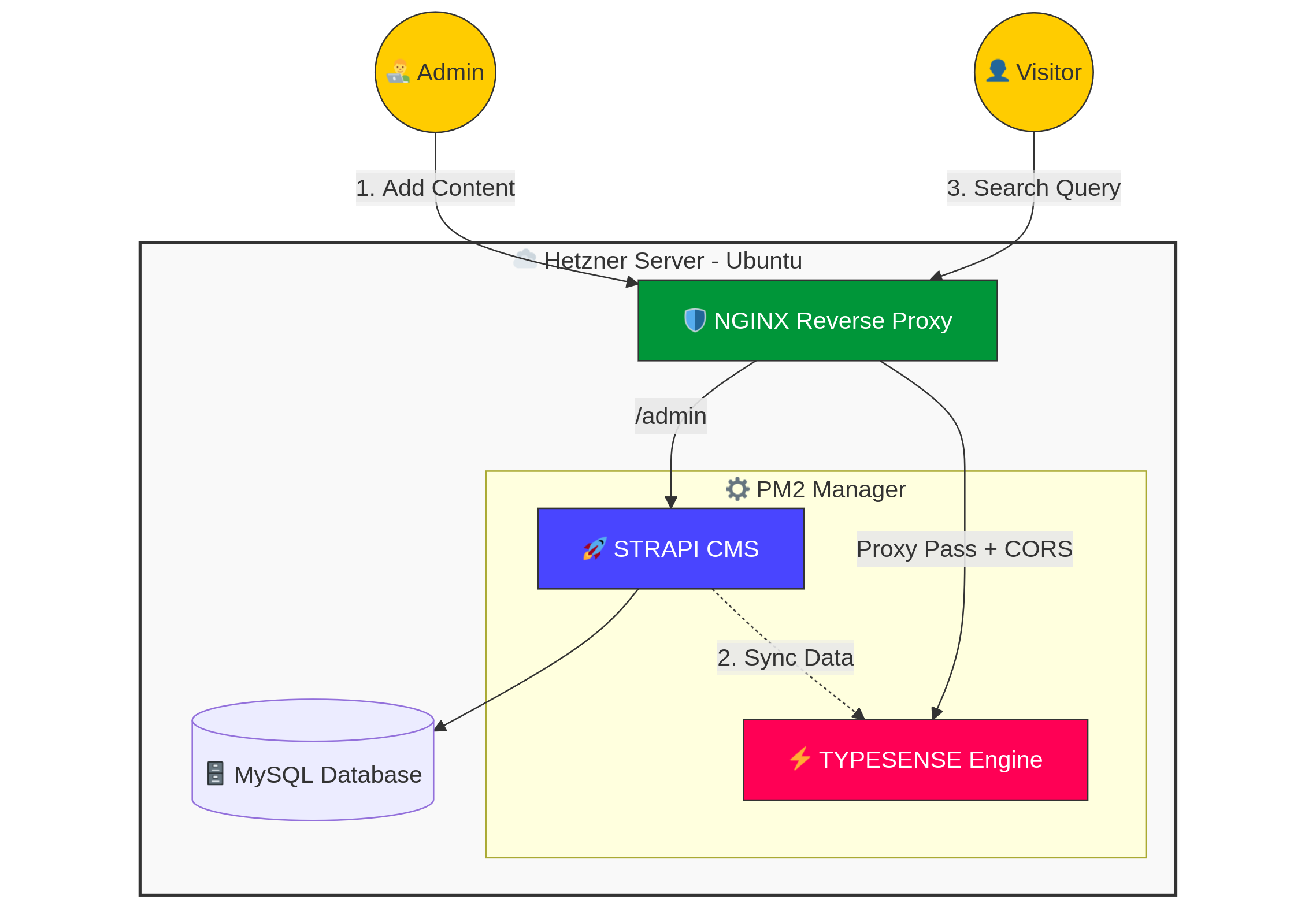
During the process, I analyzed the client’s history and realized this wasn’t just a simple server—it was a modern Headless Architecture. They were likely using Strapi (Headless CMS) to push data to Typesense via webhooks.
To solidify my understanding (and to show the client I “get” their setup), I visualized the stack using Mermaid.js.
The Result
By the end of the session, I hadn’t just written a cover letter. I had:
- A running simulation of their server environment.
- Screenshots proving a successful connection from my local frontend to the remote setup (returning
Status 200 OK). - A ready-to-use script to export the JSON Schema via the API using
curl.
Conclusion
This 2-hour “deep dive” was an investment, not a cost.
- Skill Expansion: I refreshed my knowledge of Nginx Headers, learned how Strapi syncs with search engines, and practiced Diagrams-as-Code.
- Client Confidence: Submitting a proposal isn’t a gamble when you’ve already verified the solution.
For any Senior DevOps Engineer or SysAdmin, the goal isn’t just to fix the bug—it’s to understand the entire ecosystem to prevent future ones.
Tools used: Ubuntu, Nginx, Typesense, Google Colab, Ngrok, Mermaid.js.